How to make an app
There are three ways to make an app in 2026: learn to code, use a no-code builder, or describe the app to an AI that writes it for you. The first takes months and can build anything. The second takes days and suits business apps. The third takes about a minute for a small app of your own, and is the one this guide walks through step by step.
Updated
The three ways, side by side
| Way | Time to a first app | Cost | What you get | Best for |
|---|---|---|---|---|
| Learn to code | Months | Free tools; your time | Anything, including apps for the stores | A career, or a product you will work on for years |
| Use a no-code builder | Days to weeks | Often a monthly fee to publish | Apps made of screens, forms and data tables | A business app: bookings, orders, a directory |
| Describe it to an AI | A minute to an afternoon | Free to start; paid for heavy use | From a small personal app to a web product | An app for yourself, tonight |
1. Learn to code
Code is how every app in the stores was made until recently, and it is still how the big ones are. For Android you learn Kotlin and Android Studio, for iPhone Swift and Xcode on a Mac, or one framework such as Flutter or React Native for both. All of these are free, and so are good courses.
What it costs is time. Expect a few months of steady evenings before your first app does something useful, and longer before it is good. In return there is no limit: any feature, any design, your own listing in the store.
Pick it if you want to make apps as a job, or you have one product you will keep building for years. Don't pick it because you need a chore chart by Saturday.
2. Use a no-code builder
No-code builders replace code with a visual editor: you arrange screens, connect them to tables of data, and set what each button does. They are made for apps that are mostly forms and lists, which describes a great many business apps: bookings, orders, inventories, member directories.
You will spend the first days learning the builder itself, which has its own ideas about how an app is put together. Most have a free tier for trying things out and charge a monthly fee once you publish or pass a number of users.
Pick it if the app is for a business or a club, several people will use it with accounts, and the data is the point.
3. Describe it to an AI
The newest way: you say what the app should do, and an AI writes it. People call the developer's version of this vibe coding. The tools fall into two groups, and they are for different things.
AI app builders generate a whole project, usually a web app, sometimes an app for the stores. You talk to them over an afternoon or a week, they produce real code, and you still decide about hosting, accounts and publishing. They are the fast route to a product or a prototype.
AI app makers make small apps for the person asking. App Shifter is one: you write one sentence on your Android phone and about a minute later the app is there, ready to use. There is no project, no code to look at and nothing to publish. It suits the app you wish existed and nobody would build for you: a score keeper with your family's house rules, a packing list for your kind of trip, a quiz about your own course notes.
Pick it if the app is for you, your family or your friends, and you want it now.
How to make an app by describing it
The whole process with App Shifter, on an Android phone. It takes about two minutes, most of it thinking about the sentence.
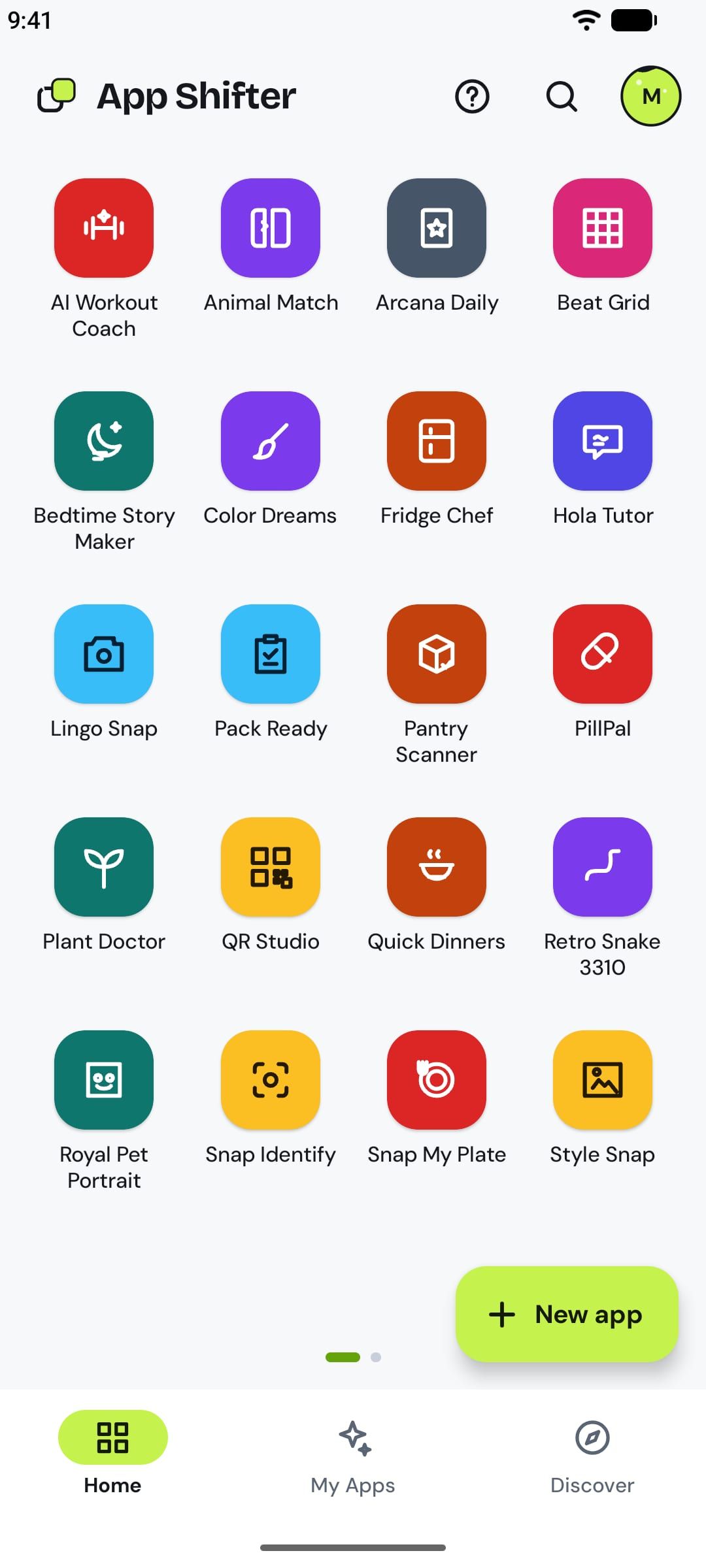 1
Get App Shifter on your Android phone
Install App Shifter from Google Play and open it. You can continue as a guest or sign in with Google; there is nothing to set up, no project to create and no computer involved.
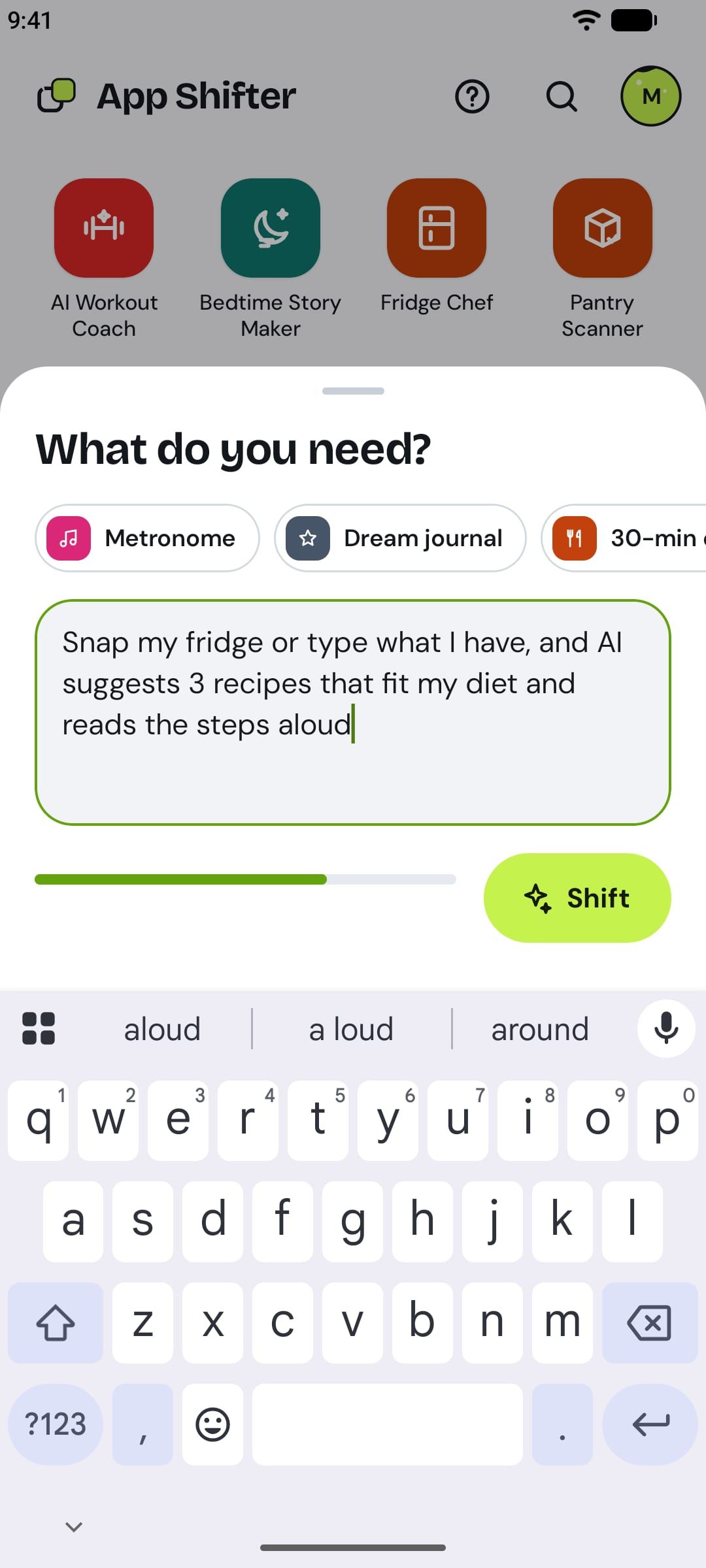 2
Describe the app in one sentence
Tap New app and write what you need in plain words, up to 150 characters. Name the thing, then what matters to you about it: "Score keeper for game night: add players, tap to add or subtract points each round, running totals, a crown on the leader, undo."
The list after the colon is where your app becomes yours. Two people who both ask for a habit tracker get different apps, because one wants streaks and the other wants a weekly chart.
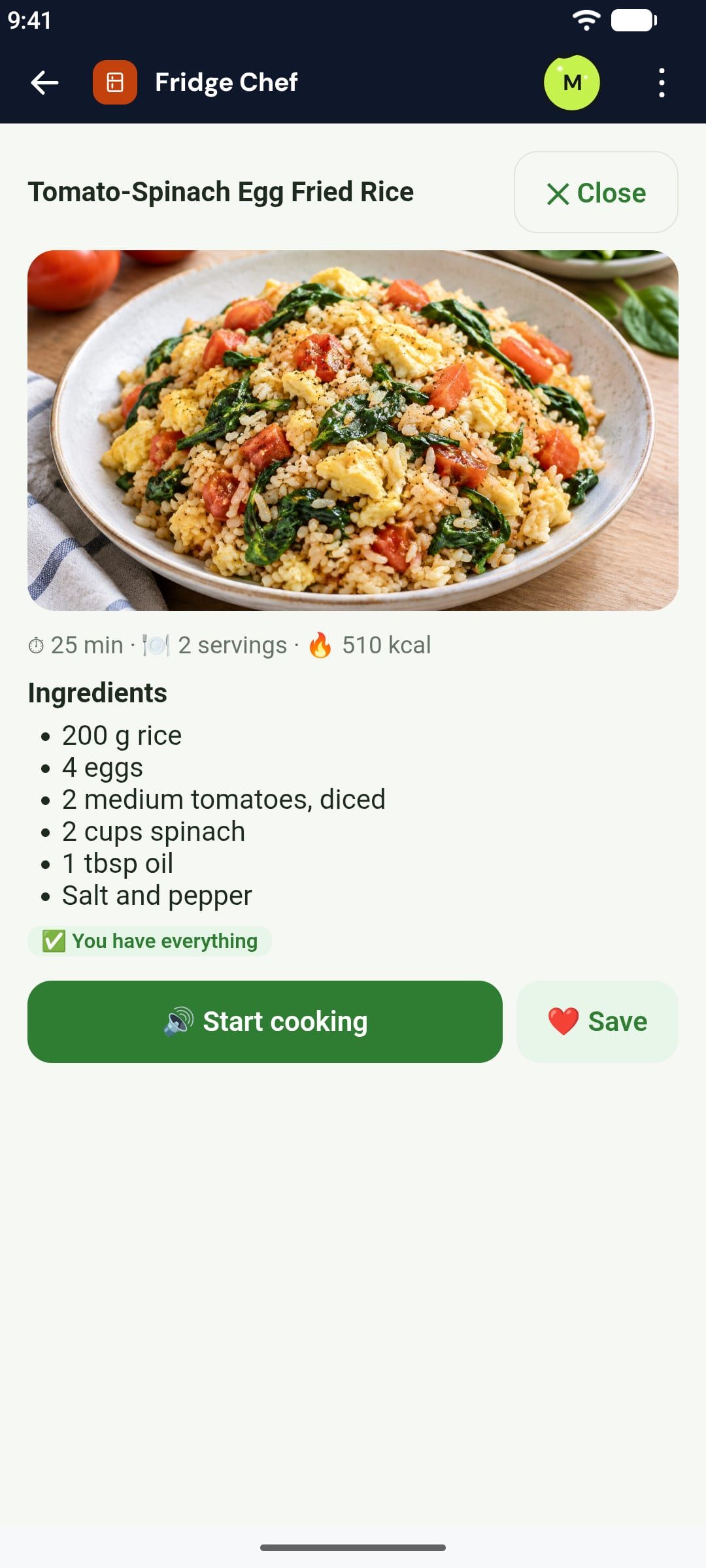 3
Open it about a minute later
App Shifter writes the app and puts it on your Home with a name and an icon of its own. You can leave while it works and come back when it tells you the app is ready.
The app is real: it keeps what you enter on your phone, works offline once opened, and can use AI, the camera, voice and reminders when the sentence asks for them.
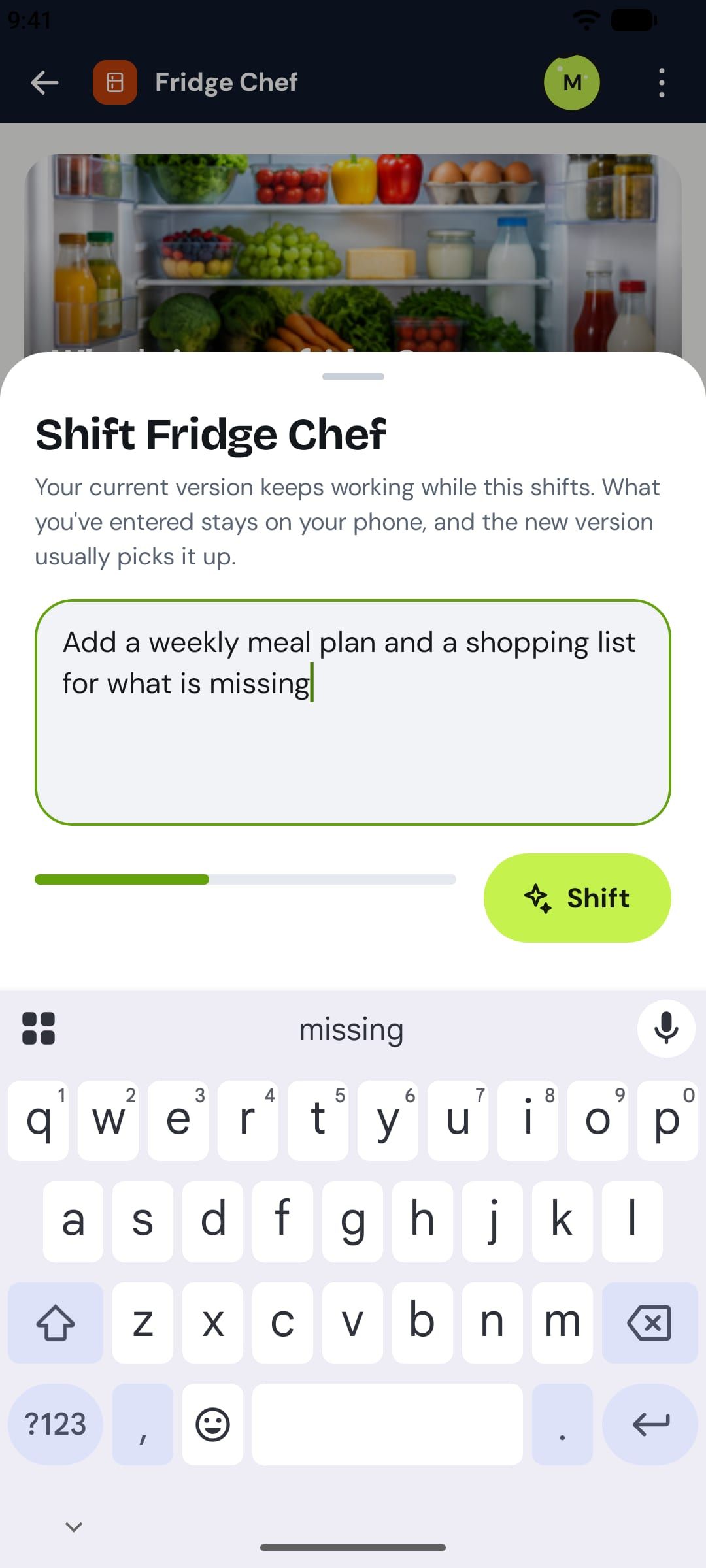 4
Change it by describing the change
Nobody gets an app right in one sentence, and you do not have to. Use it for a day, then say what is missing: "Lowest score wins, and end the game when someone passes 100." A minute later you have a new version, with what you entered kept.
 5
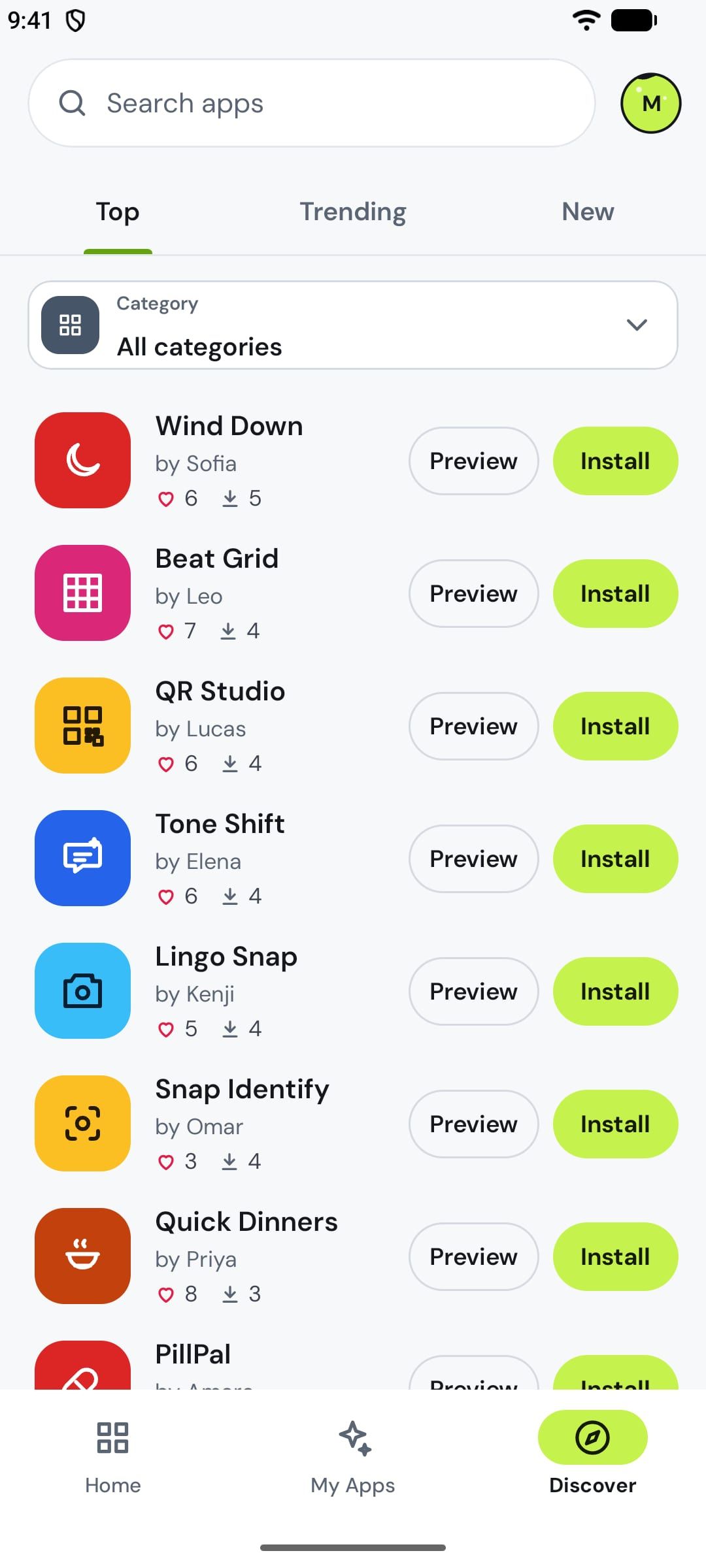
Put it on your home screen, or share it
Long-press the app to add it to your phone's home screen, where it opens like any other app. Share it by link with someone who has App Shifter, or publish it to Discover once our team has checked it.
How to write a sentence that works
- Name the thing first. "Packing list", "tally counter", "trivia quiz". The first words decide what kind of app you get.
- List what you would miss. A timer, an undo, two teams, a best score. Three or four features fit in a sentence.
- Say what it should remember. "Counts kept", "a history of finished games". Otherwise it may start fresh each time.
- Start small. One sentence makes a first version. A second sentence adds the next thing. A whole platform in one go does not work.
Three to start from
On your phone, tap one to open it in App Shifter, then change the words to fit you:
- "Tally counter: a huge tap button, minus one, reset with a confirm, several named counters each with its own color, a click sound, counts kept"Make it →
- "Countdown to my events: add a name, date and color, cards show days, hours, minutes and seconds ticking down, nearest first, edit and delete"Make it →
- "Snap my fridge or type what I have, and AI suggests 3 recipes that fit my diet and reads the steps aloud"Make it →
See what a sentence makes before you install anything
The clearest answer to "what can this make?" is to use the results. These run here in your browser, and each page shows the exact sentence that made the app:
- Free apps made from one sentence: a charades generator, a score keeper, a Secret Santa draw and more.
- AI game maker: six small games to play, from Snake to a memory game, and how to make your own.
- Use cases: what people make for cooking, fitness, family, learning and travel, including apps that use AI and the camera.
Which way should you pick?
Ask who the app is for. If it is for you (a tracker, a tool, a game for Friday), describe it to an AI maker and have it tonight; if it turns out you needed something else, you have lost a minute. If it is for a business or a group with accounts and shared data, start with a no-code builder or an AI app builder, and expect to spend days. If it is for the public, as a product, that is software development, with or without AI helping: learn to code or work with someone who does.
The ways also combine. Plenty of people make the small version for themselves first, use it for a month, and only then know what the real product should be.
Questions
Can I make an app for free?
Yes. Learning to code costs nothing but time, and the tools are free. Most no-code builders and AI makers have a free tier. App Shifter is free to start: everyone gets a weekly quota for making and changing apps, and App Shifter Pro, a monthly subscription in Google Play, gives more. Publishing your own app in a store is what costs money: a developer account on Google Play is a one-time $25, and Apple’s program is $99 a year.
Do I need to know how to code?
Not any more. A no-code builder replaces code with screens you arrange, and an AI maker replaces it with a description. Code still gives the most control, so it remains the right way for a product with many users or unusual requirements.
How long does it take to make an app?
It depends on the way. Learning to code well enough for a first real app takes months. A no-code builder takes days to weeks, most of it learning the builder. Describing a small app to an AI takes about a minute with App Shifter, and an afternoon of back-and-forth with the tools that generate a whole project.
Can I make an app on my phone, without a computer?
Yes. App Shifter runs on an Android phone and everything happens there: you type the sentence, the app appears, you use it. Most other ways to make an app need a computer.
Will my app be on Google Play or the App Store?
Not with App Shifter: the apps you make live inside App Shifter, get an icon on your home screen if you want one, and are shared by link or in Discover. If your goal is a listing of your own in a store, use an AI builder that produces a store app, a no-code builder that publishes to the stores, or code.
Can I make an iPhone app this way?
App Shifter is on Android only for now. On an iPhone, the web-based AI builders work in the browser, and Apple’s own tools need a Mac.
What kind of app can one sentence make?
A small, complete one: a tracker, a timer, a list, a calculator, a quiz, a game, a planner, a tool that uses AI or the camera for one job. Not a social network, a marketplace or a store, which need servers, accounts and months of work whichever way you choose.
Make your first app in a minute.
Describe it in a sentence. It's on your phone a minute later.
 Coming soon to iPhone